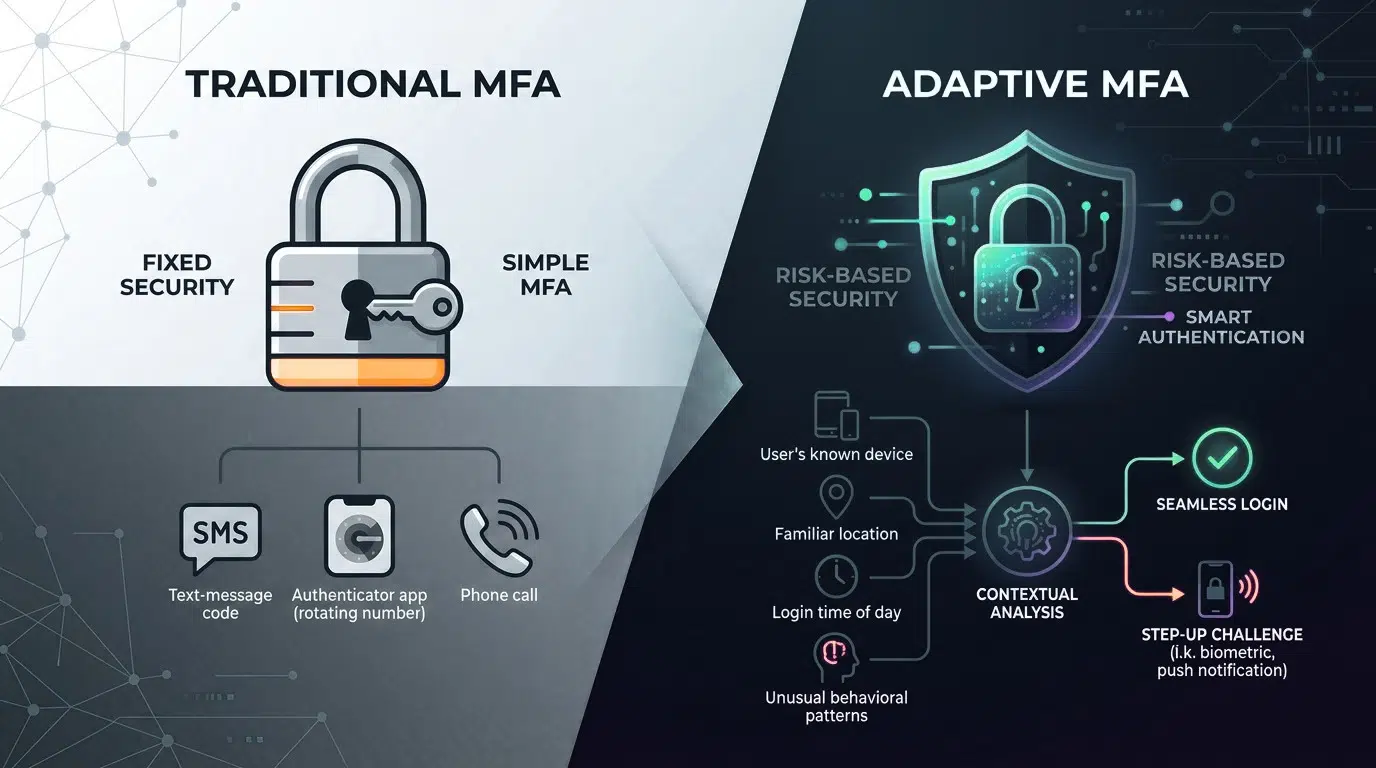
Traditional MFA Is No Longer the End of the Identity Security Conversation
Multifactor authentication (MFA) has become an important layer of protection for business applications, cloud services, Microsoft 365 environments, and privileged accounts. But simply having MFA enabled does not mean every authentication request carries the same level of risk.
Consider two login attempts:
Login 1:
An employee signs in from their usual device and normal location during business hours.
Login 2:
The same account suddenly attempts access from an unfamiliar location and device with other suspicious risk signals.
Should both login attempts receive exactly the same authentication treatment?
This is where Adaptive MFA can change the way organizations approach identity security.
Instead of relying only on a fixed MFA challenge, adaptive authentication can use contextual and risk signals to determine when stronger verification, reauthentication, or access restrictions are appropriate.
Microsoft Entra ID, for example, supports risk-based Conditional Access policies that can evaluate user risk and sign-in risk and trigger controls such as MFA, reauthentication, password changes, or blocking access.
What Is Traditional MFA?
Traditional MFA requires users to provide more than one authentication factor before accessing an application or service.
A common example is:
Username + Password → OTP / Authenticator Approval → Access
This provides significantly more protection than relying on a password alone.
However, a basic MFA implementation may apply similar authentication requirements without fully considering the context surrounding every login.
For example:
- Who is signing in?
- What device are they using?
- Where is the request coming from?
- Is the device trusted?
- Is the sign-in behavior unusual?
- Is the account showing signs of compromise?
- What application or resource is being accessed?
Traditional MFA can still be an important security control. The question for many organizations is whether it should be the only decision layer for access.
Need to evaluate your current MFA configuration? Request a Free MFA Security Review.
What Is Adaptive MFA?
Adaptive MFA, often implemented through risk-based or conditional access controls, adjusts authentication requirements according to the context and risk of an access request.
Instead of treating every login the same way, the access decision can incorporate signals such as:
- User identity
- Device information
- Location
- Sign-in behavior
- Application being accessed
- User risk
- Sign-in risk
- Authentication strength
- Other security signals available within the identity platform
Microsoft Entra ID Protection can calculate sign-in risk based on signals associated with an authentication request and user risk based on indicators that an account may be compromised. Conditional Access policies can then apply controls based on those risk conditions.
A simplified model:
Traditional MFA
Login → MFA Challenge → Access
Adaptive MFA
Login → Evaluate Context & Risk → Apply Appropriate Control → Access / Challenge / Block
That difference can help organizations move from simply verifying identity toward making more context-aware access decisions.
Want to know what risk signals your environment can use? Contact Synergy IT.
Traditional MFA vs. Adaptive MFA
| Security Consideration | Traditional MFA | Adaptive MFA |
|---|---|---|
| Password + Second Factor | ✓ | ✓ |
| Context-Aware Access | Limited depending on implementation | ✓ |
| User Risk | May not be evaluated | Can be evaluated |
| Sign-In Risk | May not be evaluated | Can be evaluated |
| Device Context | Depends on configuration | Can be incorporated |
| Location Context | Depends on configuration | Can be incorporated |
| Dynamic Authentication Requirements | Limited | ✓ |
| Risk-Based Access Policies | Not inherent | ✓ |
| Automated Response to Risky Access | Limited | Can be configured |
| User Experience | Can involve repeated challenges | Can apply challenges based on policy and risk |
Important: Adaptive MFA is not a single product or identical feature across every identity platform. Capabilities depend on the identity provider, licensing, configuration, authentication methods, and security policies in use.
Why Businesses Are Moving Toward Adaptive MFA
The transition is not simply about replacing an MFA app or changing the login screen. It is about improving how authentication decisions are made.
1. Not Every Login Has the Same Risk
A login from a known device and expected location may represent a different risk profile from an unusual sign-in.
Risk-based Conditional Access can respond differently depending on the detected risk level. Microsoft documents controls that can include allowing access, requiring MFA, requiring reauthentication, or blocking access.
Business benefit: Authentication policies can be designed around access context rather than applying identical treatment to every request.
Get an MFA policy review for your business environment.
2. Reduce Unnecessary Authentication Friction
Repeated MFA prompts can create frustration for users, particularly when policies are configured without sufficient context. Adaptive policies can be designed so stronger controls are triggered when defined risk conditions are met.
The objective is not simply more MFA prompts. The objective is appropriate authentication controls based on risk and business requirements. Microsoft notes that organizations need to balance security requirements with user productivity when choosing risk thresholds and access controls.
Let Synergy IT review your MFA policies for security and user experience.
3. Respond to Risky Sign-Ins Automatically
A major difference is the ability to connect risk detection with automated access controls. For example, an organization can configure policies that respond to elevated sign-in risk by requiring additional authentication or blocking access. Microsoft Entra risk-based Conditional Access supports these types of controls.
This can reduce dependence on an administrator manually reviewing every suspicious authentication event. Ask about risk-based MFA and automated identity protection.
What Does the Transition From Traditional MFA to Adaptive MFA Look Like?
Moving to Adaptive MFA should be treated as an identity security project, rather than simply switching on another setting.
Step 1: Assess Your Existing MFA Environment
Start by documenting:
- Which users have MFA enabled?
- Which applications require MFA?
- Which authentication methods are being used?
- Are privileged accounts protected differently?
- Are service accounts creating exceptions?
- Are legacy authentication methods still present?
- Are users experiencing excessive MFA prompts?
- Are emergency or break-glass accounts properly protected?
This assessment establishes your current identity security baseline.
Don’t know where your MFA gaps are? Request a Free MFA Security Assessment.
Step 2: Identify High-Value Accounts and Applications
Not every identity has the same business impact.
Identify:
High-priority identities
- Global administrators
- Security administrators
- Finance users
- Executives
- IT administrators
- Privileged users
High-value applications
- Microsoft 365
- CRM
- Financial systems
- HR platforms
- Cloud management consoles
- Business-critical SaaS applications
These resources may require stronger authentication and more restrictive access policies. Need help identifying high-risk identities and applications? Contact our identity security specialists.
Step 3: Define Your Risk Signals
Adaptive MFA depends on the signals your identity platform can evaluate.
Depending on the platform and configuration, these can include:
- User risk
- Sign-in risk
- Device state
- Location
- Network context
- Application
- Authentication strength
- Unusual behavior
- Compromised credentials
For Microsoft Entra ID, Microsoft documents risk-based Conditional Access using user risk and sign-in risk conditions. Find out which risk-based controls can be applied to your Microsoft environment.
Step 4: Build Conditional Access Policies
This is where your Adaptive MFA strategy becomes operational.
For example:
Low-risk access: Known user + trusted device + expected conditions. Normal authentication policy.
Medium-risk access: Unusual sign-in conditions. Require additional authentication.
High-risk access: Strong indicators of potential compromise. Require remediation or block access.
Microsoft documents risk-based Conditional Access policies that can require MFA, password changes, reauthentication, or block access depending on configured conditions. Get help designing risk-based Conditional Access policies for your business.
Step 5: Test Before Enforcing
One of the biggest mistakes organizations can make is changing authentication policies across the entire environment without understanding the impact. Microsoft recommends using Report-only mode to evaluate Conditional Access policy impact before enabling policies broadly.
A controlled rollout can include:
Pilot users → Test applications → Review results → Adjust policies → Expand deployment
This can help identify unexpected access disruptions before organization-wide enforcement.
Planning an Adaptive MFA rollout? Let Synergy IT help you test the policy impact.
Step 6: Strengthen Authentication Methods
Adaptive access policies and authentication strength should be considered together.
For higher-risk environments, organizations may want to evaluate stronger authentication methods rather than relying exclusively on basic MFA mechanisms.
Microsoft Entra Conditional Access supports authentication-strength requirements, including passwordless and phishing-resistant authentication options where applicable.
Your security team should evaluate:
- Authenticator-based methods
- Passwordless authentication
- FIDO2/security keys
- Phishing-resistant authentication
- Authentication strength policies
- Recovery processes
Need help choosing authentication methods for your workforce? Talk to a Synergy IT security expert.
Step 7: Monitor and Continuously Improve
Adaptive MFA should not be treated as a set-and-forget control.
Monitor:
- Risky sign-ins
- MFA failures
- Authentication anomalies
- Policy exclusions
- Privileged account activity
- User complaints
- False positives
- Blocked authentication attempts
- Authentication method usage
Your security team can then refine policies based on real-world activity.
Microsoft Entra provides risk-based policy capabilities that can support automated remediation and access decisions when configured appropriately. Need ongoing identity monitoring and policy optimization? Contact Synergy IT.
Common Challenges When Moving to Adaptive MFA
Transitioning from traditional MFA can create technical and operational challenges.
Legacy applications:Older applications may not support modern authentication or Conditional Access controls.
Service accounts: Non-interactive identities may require a different protection strategy.
Policy exclusions: Emergency access accounts and other carefully controlled exceptions need to be handled deliberately.
User experience: Aggressive policies can generate unnecessary authentication prompts.
Licensing: Advanced risk-based capabilities can require specific identity-platform licensing. For example, Microsoft states that risk-based Conditional Access policies using Microsoft Entra ID Protection require Microsoft Entra ID P2 or Microsoft Entra Suite capabilities.
Policy conflicts: Multiple Conditional Access policies can interact in ways that produce unexpected access decisions.
This is why Adaptive MFA implementation should begin with an assessment rather than immediately changing authentication policies. Have an existing MFA environment? Let Synergy IT review it before you migrate.
Traditional MFA Isn’t the Same as Adaptive MFA
The goal isn’t necessarily to eliminate traditional MFA.
Instead, organizations can build on their existing MFA investment by adding risk-aware access policies and stronger authentication controls where appropriate.
Think of the evolution as:
Traditional MFA
“Prove that you have another authentication factor.”
↓
Adaptive MFA
“Based on the available context and risk, determine what level of authentication and access control is appropriate.”
That distinction becomes increasingly important as businesses rely on Microsoft 365, SaaS applications, cloud infrastructure, remote work, and privileged cloud administration.
Is Your Business Ready for Adaptive MFA?
You may want to evaluate your MFA strategy if:
- MFA is enabled but applied almost identically to everyone.
- Users receive frequent unnecessary MFA prompts.
- Your organization has remote or hybrid employees.
- Employees access Microsoft 365 from multiple devices and locations.
- Privileged accounts require stronger controls.
- You have experienced suspicious sign-ins.
- Your business has cloud applications outside Microsoft 365.
- You have legacy authentication exceptions.
- You aren’t sure which Conditional Access policies are active.
- You don’t regularly review MFA exclusions and exceptions.
Get a Clear Picture of Your MFA Security:
Synergy IT can help businesses assess their existing MFA, identity, and Conditional Access configuration and identify opportunities to strengthen risk-based access controls.
Free MFA & Identity Security Assessment
Find out:
- Where your current MFA controls may have gaps
- Which users and applications require stronger protection
- Whether risk-based policies can improve your access strategy
- Where authentication friction can potentially be reduced
- What to consider before moving to Adaptive MFA
REQUEST YOUR FREE MFA SECURITY ASSESSMENT
FAQs:
What is the difference between traditional MFA and Adaptive MFA?
Traditional MFA generally requires an additional authentication factor, while Adaptive MFA can adjust authentication or access requirements based on contextual and risk signals.
Is Adaptive MFA more secure than traditional MFA?
Adaptive MFA can provide additional context-aware controls, but the security outcome depends on the identity platform, authentication methods, policies, configuration, and implementation.
Can Adaptive MFA work with Microsoft 365?
Yes. Microsoft Entra Conditional Access supports policies that can evaluate conditions around Microsoft 365 and other cloud application access. Risk-based Conditional Access can incorporate user and sign-in risk when the required capabilities and licensing are available.
Does Adaptive MFA eliminate MFA prompts?
No. Adaptive MFA does not inherently mean fewer MFA prompts in every situation. Policies can be configured to require stronger authentication when defined conditions or risk levels are met.
Can Adaptive MFA block risky users?
Yes. Risk-based Conditional Access can be configured to block access or require remediation depending on the risk condition and policy configuration.
Is Adaptive MFA the same as passwordless authentication?
No. They address different aspects of identity security. Adaptive MFA concerns how authentication and access requirements can respond to context or risk, while passwordless authentication changes the authentication method itself.
How should a business start transitioning to Adaptive MFA?
Start with an assessment of your current MFA methods, identity platform, applications, privileged accounts, exceptions, Conditional Access policies, and licensing. Then design and test risk-based policies before broader enforcement.
Does Adaptive MFA require Microsoft Entra ID P2?
For Microsoft Entra’s risk-based Conditional Access policies using Microsoft Entra ID Protection, Microsoft states that Microsoft Entra ID P2 or Microsoft Entra Suite is required. Other Conditional Access capabilities have different licensing requirements.